Using the Prompt Gallery - Browse and Apply Pre-Made Prompts
Learn how to use the AI Prompt Gallery in Gemini Photo. Browse free and premium prompts, search, filter, and apply them to create stunning images.
Using the Prompt Gallery
The Prompt Gallery is a curated collection of pre-written prompts designed to help you create stunning AI images. Browse, search, and apply prompts created by experts to jumpstart your creativity.
What is the Prompt Gallery?
The Prompt Gallery is a searchable directory of AI image prompts organized by:
- Categories: Different types of images and styles
- Tiers: Free and Premium prompts
- Tags: Searchable keywords and themes
- Examples: Before/after visual demonstrations
Benefits
- Save Time: No need to write prompts from scratch
- Learn: See what makes effective prompts
- Inspire: Discover new creative possibilities
- Quality: Expert-crafted prompts for better results
Accessing the Gallery
How to Find It
- Navigate to the Prompt Gallery section
- Browse featured prompts on the main page
- Use search and filters to find specific prompts
- Click on any prompt to see details
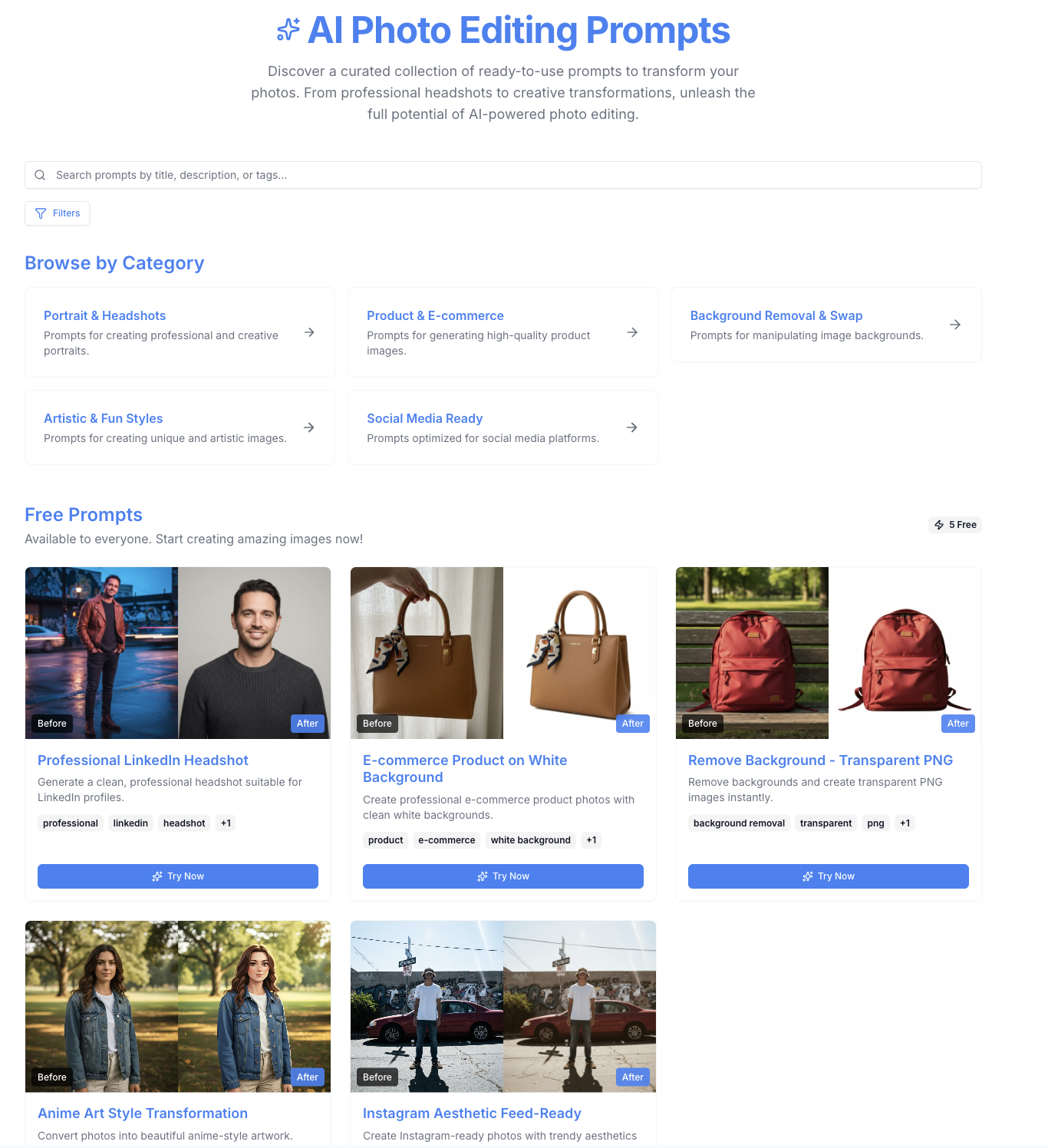
Gallery Interface
Main Features:
- Search bar for finding prompts
- Category filters
- Tier filter (Free/Premium)
- Tag filters
- Prompt cards with previews
- Before/after examples
Browsing Prompts
Main Gallery View
What You'll See:
- Grid of prompt cards
- Featured prompts highlighted
- Category sections
- Search and filter options
- Premium badges on premium prompts
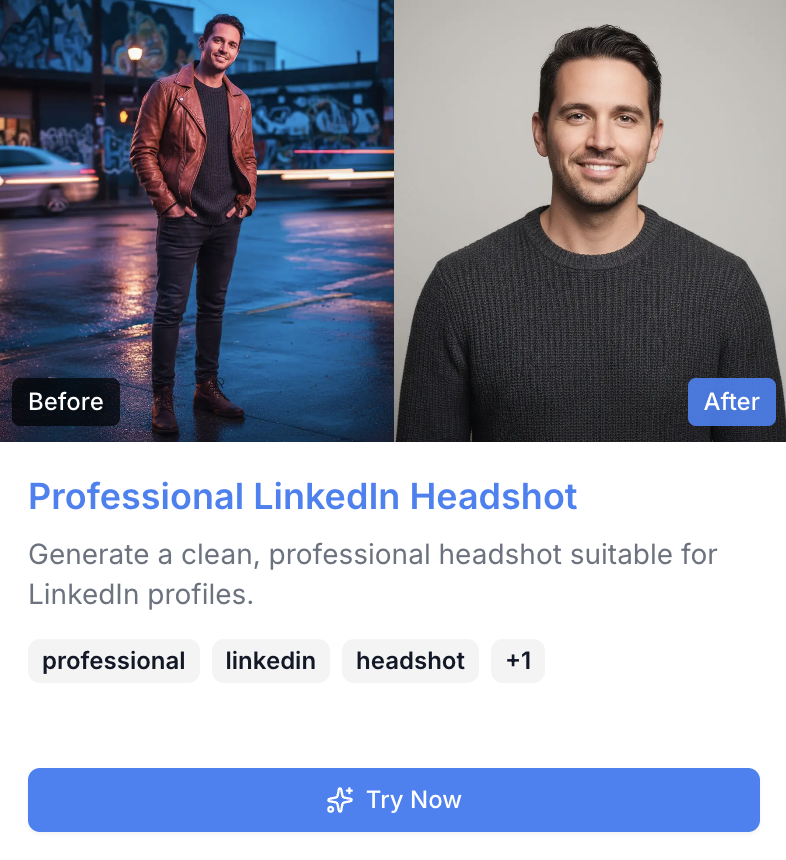
Prompt Cards
Each card shows:
- Prompt title
- Brief description
- Category and tags
- Free or Premium badge
- Before/after preview (if available)
- "Try This Prompt" button
Searching Prompts
Search Functionality
Search Across:
- Prompt titles
- Descriptions
- Tags
- Categories
- Prompt text (for free prompts)
How to Search
- Enter keywords in search bar
- Results update automatically
- Filter results further if needed
- Click prompt to view details
Search Tips
- Use specific keywords
- Try different terms
- Combine search with filters
- Search by style or subject
Filtering Prompts
Category Filter
Available Categories:
- Portrait
- Landscape
- Product
- Abstract
- Character Design
- And more...
How to Filter:
- Select category from filter
- View prompts in that category
- Combine with other filters
- Clear to see all prompts
Tier Filter
Free Prompts:
- Fully accessible
- Complete prompt visible
- No subscription required
- Great for learning
Premium Prompts:
- Require active subscription
- Title and description visible to all
- Full prompt for subscribers
- Advanced techniques
Tag Filter
Using Tags:
- Filter by specific themes
- Combine multiple tags
- Find related prompts
- Discover new categories
Applying Prompts
Method 1: Try This Prompt Button
For Free Prompts:
- Click "Try This Prompt" on any free prompt
- Automatically redirected to editor
- Prompt is pre-filled
- Generate your image
For Premium Prompts:
- Requires active subscription
- Click "Try This Prompt"
- Prompt loads in editor
- Generate with premium prompt
Method 2: Copy and Customize
Steps:
- View prompt details
- Copy the prompt text
- Paste into editor
- Customize as needed
- Generate your image
Customizing Prompts
Ways to Customize:
- Add your own details
- Modify style preferences
- Change specific elements
- Combine with other prompts
- Adjust for your needs
Example: Original Prompt:
A serene mountain landscape, photorealistic, detailed
Customized:
A serene mountain landscape at sunset, golden hour lighting, lake in foreground, photorealistic, detailed, peaceful atmosphere
Free vs Premium Prompts
Free Prompts
Access:
- Fully accessible to everyone
- Complete prompt text visible
- No subscription needed
- Great starting point
Best For:
- Learning prompt writing
- Basic image creation
- Experimentation
- Getting started
Premium Prompts
Access:
- Title and description visible to all
- Full prompt requires subscription
- Advanced techniques
- Professional quality
Benefits:
- Expert-crafted prompts
- Advanced techniques
- Better results
- Professional quality
Subscription Required:
- Active subscription needed
- Access to all premium prompts
- Try prompts directly
- Full prompt library
Learn more about premium prompts.
Prompt Categories
Understanding Categories
Portrait:
- Character and people prompts
- Professional headshots
- Artistic portraits
- Character design
Landscape:
- Nature scenes
- Cityscapes
- Environments
- Outdoor scenes
Product:
- Product photography
- E-commerce images
- Marketing visuals
- Professional products
Abstract:
- Non-representational art
- Patterns and designs
- Creative concepts
- Artistic expressions
Learn more about prompt categories.
Before/After Examples
Visual Demonstrations
What You'll See:
- Original prompt text
- Generated result image
- Side-by-side comparison
- Quality examples
Benefits:
- See expected results
- Understand prompt effectiveness
- Learn from examples
- Set expectations
Best Practices
Using the Gallery Effectively
1. Start with Free Prompts
- Learn the basics
- Understand structure
- Build confidence
- Then explore premium
2. Search Before Creating
- Check if prompt exists
- Save time
- Learn from examples
- Build on existing work
3. Customize Prompts
- Don't just copy
- Add your vision
- Make it unique
- Experiment with variations
4. Learn from Examples
- Study before/after images
- Understand what works
- Apply lessons learned
- Improve your prompts
Integration with Editor
Seamless Workflow
How It Works:
- Browse gallery
- Find desired prompt
- Click "Try This Prompt"
- Automatically opens editor
- Prompt pre-filled
- Generate immediately
Benefits:
- No manual copying
- Fast workflow
- Easy to try prompts
- Quick experimentation
Tips for Best Results
Choosing the Right Prompt
- Match your goal
- Consider style preferences
- Check before/after examples
- Read descriptions carefully
Customizing Effectively
- Keep core structure
- Add specific details
- Maintain style consistency
- Test variations
Learning from Prompts
- Study effective prompts
- Understand structure
- Learn modifiers
- Apply techniques
Troubleshooting
Can't Access Premium Prompts?
- Verify subscription is active
- Check account status
- Refresh page
- Contact support if needed
Prompt Not Working?
- Check if copied correctly
- Verify all text included
- Try original prompt first
- Customize gradually
Next Steps
Use the Prompt Gallery to discover new possibilities and create stunning AI images with expert-crafted prompts!